
Trying out the Gemini Decisions API on Android
The Gemini Decisions API was released yesterday and I decided to try it out on Android and explore some of the use cases. In this blog I’ll share some of the experiments that I ran.
Differently from Generative models, the Gemini Decisions API evaluates typed questions and returns probabilities. It generates zero text tokens, which means that its responses are fast, and easy to parse. Because it doesn’t generate text tokens, your output token usage is always 0 (which also means you will not be paying for its output).
There are three types of questions that you can send to the Gemini Decisions API:
- Noul - Yes/No questions to check whether a statement is true or false.
- Choice - Provide the model with a list of options and let it choose the most suitable option.
- Score - Give the model a rubric for it to rate your input against.
Before we dive in and break down each of them with examples, let’s do some set up.
Setting it up for Android (or any mobile app, really)
At the time of writing, this new API is not yet available on Firebase AI Logic - if it was, it would allow me to call the Decision model securely from the client-side (like an Android app) without spinning up my own backend. But because it isn’t, I had to set up a tiny backend for this: a callable Cloud function. The flow is: my Android app calls the Cloud function, and the Cloud function will then call the Decisions API, and return its response to the Android app.
The Cloud function is responsible for:
- Enforcing App Check to make sure the request is coming from my legitimate Android app.
- Forwarding the request to the Gemini Decisions API (using the js-genai SDK).
Writing and deploying the Cloud function
In order to set up the Cloud function, I had to:
-
Run the command
firebase init functions -
Write the code to proxy requests to the API:
functions/index.js const {setGlobalOptions} = require("firebase-functions");const {onCall} = require("firebase-functions/v2/https");const {defineSecret} = require("firebase-functions/params");const {GoogleGenAI} = require("@google/genai");setGlobalOptions({maxInstances: 10});const geminiApiKey = defineSecret("GEMINI_API_KEY");exports.createDecision = onCall({secrets: [geminiApiKey]}, async (request) => {const ai = new GoogleGenAI({apiKey: geminiApiKey.value()});return ai.decisions.create({model: "gemini-decision-1",input: request.data.input,questions: request.data.questions,});}); -
Configure my Gemini API key using:
firebase functions:secrets:set GEMINI_API_KEY -
Deploy the function:
firebase deploy
Setting up App Check to secure this implementation
Because createDecision uses my GEMINI_API_KEY under the hood, leaving the endpoint open would allow anyone with the URL to call it directly and burn through my quota. Notice enforceAppCheck: true in the onCall options above—with that single flag, Cloud functions automatically rejects any request that doesn’t carry a valid Firebase App Check token.
On the Android side, since I’m testing locally rather than distributing through Google Play, I used the App Check debug provider (for a production release, swap this out for the Play Integrity provider):
- Add the debug provider dependency to
app/build.gradle.kts(using the Firebase BoM):
implementation(platform("com.google.firebase:firebase-bom:35.1.0"))implementation("com.google.firebase:firebase-appcheck-debug")implementation("com.google.firebase:firebase-functions")- Initialize App Check inside a custom
Applicationclass (registered viaandroid:name=".DecisionsApplication"inAndroidManifest.xml) before making anyFirebase.functionscalls:
class DecisionsApplication : Application() { override fun onCreate() { super.onCreate() Firebase.initialize(context = this) Firebase.appCheck.installAppCheckProviderFactory( DebugAppCheckProviderFactory.getInstance() ) }}- Launch the app once and grab the generated debug secret from Logcat:
D DebugAppCheckProvider: Enter this debug secret into the allow list in the Firebase Console for your project: XXXXXXXX-XXXX-XXXX-XXXX-XXXXXXXXXXXX- In the Firebase Console, go to App Check > Apps, open Manage debug tokens on the Android app by clicking on the three-dot menu, and add that secret. From then on,
Firebase.functionsautomatically attaches a valid App Check token to everycreateDecisioncall!
Now that the function is up and running, let’s walk through all the question types.
Noul - yes or no?
This type of question allows you to ask the model a “yes or no” question - and because the Decisions API is multimodal, you can send more than text to the model: you can also pass images, audio, video, and PDFs! :)
To show it in action, I created a simple demo where the user is scanning a receipt. To be considered a valid receipt, all of these need to be visible in the image: store name, prices for each item, and total.
To scan the receipt, I’m using the CameraX library with a custom ImageAnalysis.Analyzer that samples camera frames locally every 600ms and sends the latest frame to the Cloud function roughly every 1.5 seconds.
Here’s what the code to send the frame looks like:
val request = DecisionRequest(    input = Content.Image(        mimeType = "image/jpeg",        bytes = frameBytes, // byte array    ),    questions = mapOf(        "is_valid_receipt" to Question.Noul(            instructions = "Does this receipt clearly show the store name," +                " an itemized breakdown with prices, and the total amount?",            criteria = NoulCriteria(                trueDescription = "Store name, item breakdown with prices," +                    " and total amount are all present and legible.",                falseDescription = "One or more of store name, itemized prices," +                    " or total are missing or unreadable.",            ),        ),    ),)
val payload = DecisionRequestSerializer.serialize(request)val rawData = Firebase.functions    .getHttpsCallable("createDecision")    .call(payload)    .await()    .getData()
val result = DecisionResponseDeserializer.deserialize(rawData)val noulAnswer = result.answers?.get("is_valid_receipt") as? Answer.Noulval isValid = (noulAnswer?.noul ?: 0.0) >= 0.5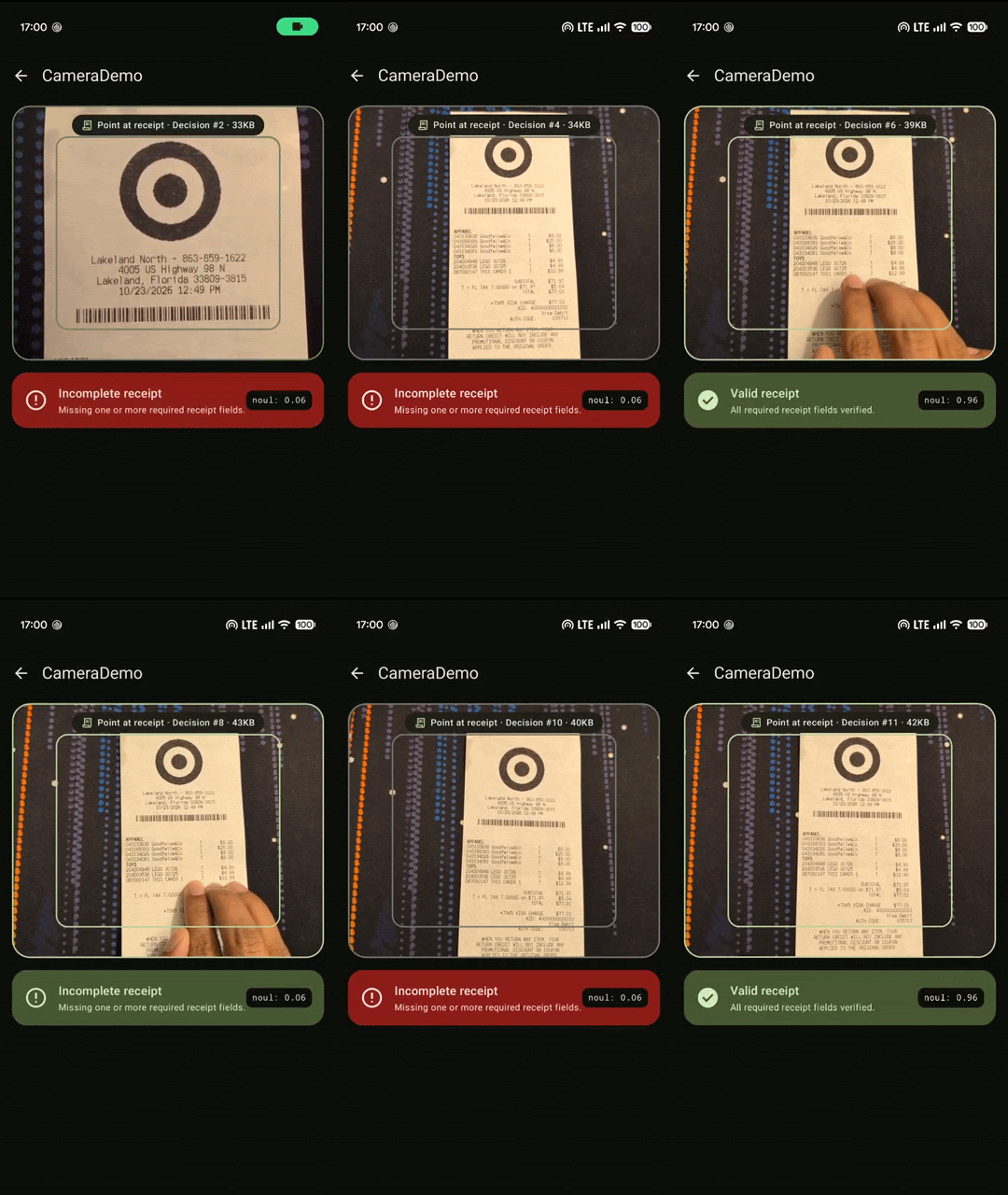
Choice - choose one
By using a choice question we could, for example, automatically select the most appropriate category where the user can file a support case based on the text they provide.
This demo shows a hypothetical app where developers can file a support case to Firebase. As the user types, the model automatically picks the most suitable support category from this list of categories:
- Bug
- Feature Request
- Billing
- Analytics help
- General question
- Report spam
- Phishing
- Account issue
val request = DecisionRequest(    input = issueText,    questions = mapOf(        "support_category" to Question.Choice(            instructions = "Choose the single best Firebase support category for" +                " this customer support issue.",            criteria = mapOf(                "bug" to "Crashes, exceptions, errors, broken SDK behavior, or regressions in Firebase.",                "feature_request" to "Requests for new Firebase capabilities, APIs, or console enhancements.",                "billing" to "Questions or issues regarding Blaze or Spark plans, invoices, charges, payments, or refunds.",                "analytics_help" to "Help with Google Analytics for Firebase, conversion events, funnels, audiences, or DebugView.",                "general_question" to "General how-to questions, best practices, or Firebase documentation inquiries.",                "report_spam" to "Reports of unsolicited spam, bot signups, SMS pumping, or automated abuse.",                "phishing" to "Reports of suspicious emails, fake login links, credential theft, or impersonation.",                "account_issue" to "Sign-in issues, two-factor lockouts, IAM permissions, console access, or ownership transfers.",            ),        ),    ),)
val payload = DecisionRequestSerializer.serialize(request)val rawData = Firebase.functions    .getHttpsCallable("createDecision")    .call(payload)    .await()    .getData()
val result = DecisionResponseDeserializer.deserialize(rawData)val choiceAnswer = result.answers?.get("support_category") as? Answer.Choiceval matchedCategory = choiceAnswer ?.let { SupportCategory.fromOptionId(it.choice) } ?: SupportCategory.GENERAL_QUESTIONScore - rate it on a scale
To show you the score question, I have an example where the user is rating a restaurant they have recently visited. As they start typing the review, the model can suggest the number of stars to give from 1-5.
val request = DecisionRequest(    input = reviewText,    questions = mapOf(        "restaurant_rating" to Question.Score(            instructions = "Score the sentiment of this restaurant review from" +                " lowest (1 star) to highest (5 stars).",            criteria = listOf(                "1 star: Very negative experience; severe complaints about food quality, hygiene, or rude staff.",                "2 stars: Below expectations; noticeable issues such as cold food, slow service, or poor value.",                "3 stars: Neutral or mixed experience; acceptable food and service with pros and cons.",                "4 stars: Positive experience; good food and friendly service with minor flaws at most.",                "5 stars: Exceptional experience; enthusiastic praise for delicious food and standout service.",            ),        ),    ),)
val payload = DecisionRequestSerializer.serialize(request)val rawData = Firebase.functions    .getHttpsCallable("createDecision")    .call(payload)    .await()    .getData()
val result = DecisionResponseDeserializer.deserialize(rawData)val scoreAnswer = result.answers?.get("restaurant_rating") as? Answer.Score// Score levels are 0-indexed (0..4), so add 1 to map to 1..5 starsval stars = scoreAnswer?.let { (it.score.roundToInt() + 1).coerceIn(1, 5) }Multiple questions
Another cool feature of the API is that you can pass up to (aprox) 1000 questions (as long as you’re within the context window size). So you could evaluate multiple questions all at once!
Let’s build a recipe auto-tagger that evaluates 6 questions across noul, choice, and score in a single request when picking a recipe:
- 3 dietary flags (
noul): Is it vegetarian? Gluten-free? Dairy-free? - 2 classifications (
choice): Meal course & cuisine style - 1 rating (
score): Prep difficulty (Easy, Medium, Hard)
val request = DecisionRequest(    input = recipeText,    questions = mapOf(        "is_vegetarian" to Question.Noul(            instructions = "Is this recipe vegetarian (contains no meat, poultry, fish, or seafood)?",        ),        "is_gluten_free" to Question.Noul(            instructions = "Is this recipe naturally gluten-free (contains no wheat flour, regular pasta, or bread)?",        ),        "is_dairy_free" to Question.Noul(            instructions = "Is this recipe dairy-free (contains no milk, butter, cream, cheese, or buttermilk)?",        ),        "meal_type" to Question.Choice(            instructions = "Which meal course best fits this recipe?",            criteria = mealTypeCriteriaMap,        ),        "cuisine" to Question.Choice(            instructions = "Which cuisine style best matches this recipe?",            criteria = cuisineCriteriaMap,        ),        "difficulty" to Question.Score(            instructions = "Rate how difficult and time-consuming this recipe is to prepare.",            criteria = difficultyRubric,        ),    ),)
val payload = DecisionRequestSerializer.serialize(request)val rawData = Firebase.functions    .getHttpsCallable("createDecision")    .call(payload)    .await()    .getData()
val answers = DecisionResponseDeserializer.deserialize(rawData).answersval isVegetarian = ((answers?.get("is_vegetarian") as? Answer.Noul)?.noul ?: 0.0) >= 0.5val isGlutenFree = ((answers?.get("is_gluten_free") as? Answer.Noul)?.noul ?: 0.0) >= 0.5val isDairyFree = ((answers?.get("is_dairy_free") as? Answer.Noul)?.noul ?: 0.0) >= 0.5val mealType = (answers?.get("meal_type") as? Answer.Choice)?.choiceval cuisine = (answers?.get("cuisine") as? Answer.Choice)?.choiceval difficulty = (answers?.get("difficulty") as? Answer.Score)?.scoreConclusion
A lot of features we build into mobile apps don’t actually need open-ended text generation - they just need a fast, reliable answer to a structured question: Is this image clear enough? Which category should be pre-selected? How many stars does this review sound like?
Until now, building these experiences with an LLM usually meant asking a generative model for structured JSON output and paying the latency and cost of generated tokens. With the Gemini Decisions API, you get calibrated probabilities across noul, choice, and score questions with zero output tokens, predictable responses, and the ability to evaluate multiple questions against the same input in one round-trip.
Even though calling it from Android currently requires a tiny Cloud Function proxy secured with App Check, the setup only takes a few lines of code, and hopefully we’ll see direct client support in Firebase AI Logic in the future!
Oh, and if you’d prefer to run inference on-device, the Mediapipe Decision Maker library has you covered. :)
And that’s all for today, if you’d like to try out the Gemini Decisions API yourself, check out the documentation or try the playground in Google AI Studio.